For creators, bloggers and solo writers

A newsletter tool for creators and bloggers.

Put one link in your bio. Readers subscribe on a page with your name on it, confirm from their own inbox, and get every issue by email — and each issue you send can also live on the web at its own address. Free up to 100 contacts, then priced by list size.

No credit card Every reader confirms Send from your own domain
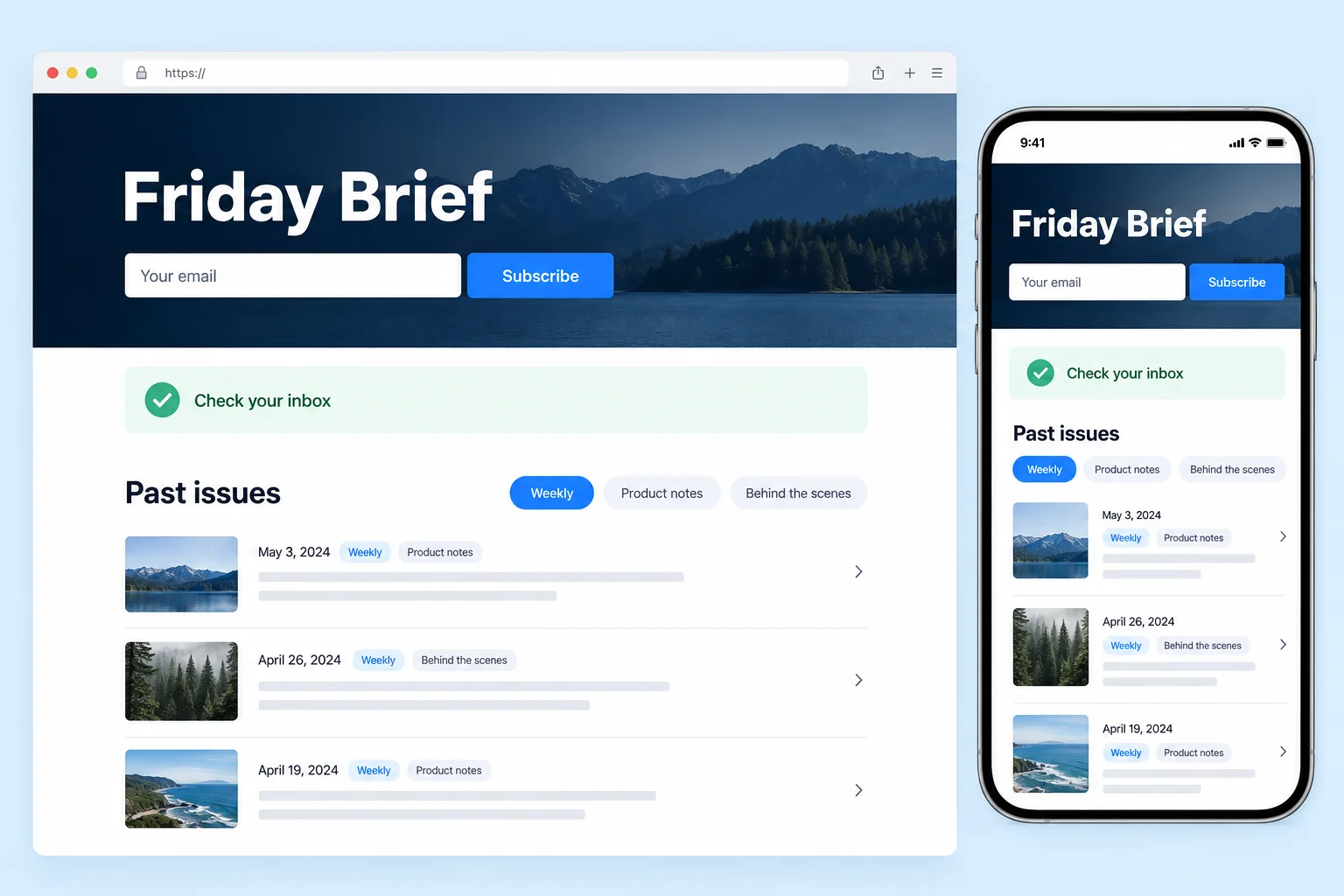
Concept interface showing a branded subscribe page, confirmation state, mobile view and past issues archive
Product interface concept
The short answer

What it is, in one paragraph

MAAC Go Email is a self-serve newsletter tool from Crescendo Lab. For creators and bloggers it covers the loop from sign-up to send: a hosted subscribe page at edm.cresclab.com/p/your-name, a public archive where every issue you send gets its own indexable URL, confirmed (double) opt-in for every sign-up, sending from your own verified domain, and delivery, open, click and unsubscribe reports. It is priced by active contacts — free up to 100 contacts and 200 emails a month, then from US$17 a month for 500 contacts with ten emails per contact included. It also has an email API and an MCP server. It does not handle paid subscriptions or automated sequences.

Free plan
100 contacts, 200 emails a month, no credit card
Paid plans
From US$17 a month for 500 contacts (5,000 emails included)
Sign-ups
Double opt-in, always — readers confirm from their inbox
Hosted page
Subscribe form, links and archive at edm.cresclab.com/p/your-name
Your domain
SPF, DKIM and a return-path MX — verify it on any plan, including free
Not included
Paid subscriptions, automated sequences, a recommendation network

Updated 28 September 2026 · Prices from the live price list

Who it suits

Built for people who publish, not for marketing departments.

You already write. This is the part that gets it to the people who asked for it — and keeps the list yours.

A good fit if

  • You publish on a schedule — weekly, fortnightly or monthly — and want readers to get it in their inbox.
  • You don't have a website, or don't want another one. The hosted page works as your link in bio.
  • You want real readers. Every sign-up confirms from their own inbox before it joins your list.
  • You want to own it. Send from your own domain; export the list as a CSV any time.
  • You like handing routine work to an agent or a script — there is an API and an MCP server.

Look elsewhere if

  • Charging readers is the point. There is no paid-subscription billing; a platform built around paid subscriptions, such as Substack, fits better.
  • You need automated sequences such as a welcome series or timed follow-ups. Every email here is one you send or schedule.
  • You want a recommendation or referral network to grow your list for you.
  • You need the public page on your own domain, or RSS-to-email, today.
How it works

Three steps from a link in your bio to a sent issue.

  1. 1

    Switch on your page

    Under Contacts → Grow, pick your address (edm.cresclab.com/p/your-name), a headline, an intro and up to six links. Put it in your bio, paste the sign-up form onto your own site as plain HTML — no JavaScript, works in site builders — or add a one-line script for an inline box or a slide-in pop-up. Add ?src=instagram to the link, or name each spot, and every reader shows which entrance brought them.

  2. 2

    Readers confirm

    Everyone who signs up gets a confirmation email from your sender address and joins your list only after clicking it. Anyone who hasn't clicked gets one reminder about two days later, and never another. Confirmation emails don't count against your allowance. Optionally, show a thank-you message — a first read, a welcome note — once they confirm.

  3. 3

    Write and send

    Write in a document-style editor with templates that carry your logo and colours; AI can draft an issue from a short brief or suggest subject lines. Choose who gets it — everyone, a tag, people engaged in the last 90 days — then send now or schedule it. With the archive on, the issue also goes up on the web at its own address.

What you get

Everything a newsletter needs to be found, read and kept.

PAGE

Hosted page and archive

Your name, logo and colour, a subscribe form and your links. With the archive on, past issues each get a URL with a canonical tag, description and share card, and the page is listed in a sitemap.

OPT-IN

Confirmed readers only

Double opt-in on every sign-up, from the hosted page and from forms on your own site. The list you grow is people who asked for your emails.

DNS

Your own domain

Verify with three DNS records (SPF, DKIM and a return-path MX) on any plan and send as hello@yourdomain.com. Replies go to the address you choose.

DATA

Reports that count people

Delivered, opened, clicked and unsubscribed for every issue. For the subscribe page: views, addresses given and confirmations, with sign-ups by entrance.

CSV

A list you can take with you

Export to CSV any time. Unsubscribes, bounces and complaints are suppressed automatically. Bring a list from another tool as a CSV, unsubscribes included.

MCP

API and MCP server

An email API, and an MCP server so Claude, Cursor or Codex can send or schedule a draft and read the report. Setup guide

Pricing

Priced by list size. On a paid plan, weekly sending fits inside it.

Plans are sized by active contacts — people who unsubscribed or bounced never count. Every paid plan includes ten emails per contact per month, so a newsletter that goes out up to twice a week stays inside it. Free includes 200 emails a month, about two sends to a full 100-reader list. Monthly, cancel anytime.

International plans (USD)
Active contactsEmails included / monthPrice / month
Up to 100200Free
5005,000US$17
1,00010,000US$26
2,50025,000US$52
5,00050,000US$87
10,000100,000US$130
25,000250,000US$349
50,000500,000US$629

What it costs, worked out

  • US$17 / month300 readers, weekly — about 1,300 emails a month, on the 500-contact plan.
  • US$26 / month1,000 readers, weekly — about 4,300 emails a month.
  • US$87 / month5,000 readers, twice a week — about 43,000 emails a month.

Emails beyond the included volume cost US$2 per 1,000 from a prepaid balance (minimum top-up US$10). Free-plan emails carry a one-line “Sent via MAAC Go” footer, removed on a paid plan. Team seats come with the plan and are never sold separately: two on Free (you and one teammate), five on paid plans, fifteen from 10,000 contacts up.

Writing from Taiwan? Accounts opened from the Chinese page, or from a browser whose first language is Traditional Chinese (zh-TW or zh-Hant), are billed per email in New Taiwan dollars instead. Full details on the pricing page.

Honest limits

What it doesn't do.

Better you read it here than find out after you have moved your list.

No paid subscriptions

You can't charge readers or put issues behind a paywall. If that is the business, a platform built around paid subscriptions, such as Substack, fits better.

No automated sequences

No welcome series or timed follow-ups — every email is one you send or schedule. A reader who confirms can see a one-time thank-you message on the page.

No growth network

No referral rewards, recommendations or cross-promotion between newsletters. Readers come from your own links and your own site.

The page lives on our domain

Your public page stays at edm.cresclab.com/p/your-name, and its footer carries a “Sent with MAAC Go Email” line on every plan, paid ones included.

The archive publishes what you have sent

Switching the archive on publishes every issue you have already sent, including any codes inside them. An issue with “View in browser” unticked in the editor stays off.

No RSS-to-email, no one-click import

Issues are written in the editor, not pulled from a feed. Lists from other tools come over as a CSV.

FAQ

Questions creators ask first.

Is MAAC Go Email a good newsletter tool for creators and bloggers?
It fits if you want a hosted subscribe page and archive, confirmed opt-in for every reader and sending from your own domain, priced by list size and free up to 100 contacts. It is not the right tool if you need to charge readers, run automated sequences or grow through a recommendation network.
Is there a free plan?
Yes: up to 100 contacts and 200 emails a month, with no credit card. The subscribe page, the archive, verifying your own domain, reports, the API and the MCP server are all included. Free-plan emails carry a one-line “Sent via MAAC Go” footer, which goes away on a paid plan.
How much does a newsletter with 1,000 subscribers cost?
US$26 a month on the 1,000-contact plan, which includes 10,000 emails a month; a weekly issue to 1,000 people uses about 4,300. Only active contacts count, so people who unsubscribe or bounce stop counting.
Do I need my own website?
No. Your public page at edm.cresclab.com/p/your-name carries your name, logo, colour, an intro, up to six links and the subscribe form, so it can be the link in your bio. If you do have a site, paste the form as plain HTML (no JavaScript, it works inside site builders) or add a one-line script for an inline box or a pop-up.
Can I email a list I import straight away?
Part of it at first. New accounts start on a shared sending address. It reaches you, your team and readers who confirmed through your subscribe page, plus up to 50 imported contacts a day (200 in total) so you can try it for real; that allowance pauses if those sends bounce heavily or draw a spam complaint. A list you grow with the page works from day one. To send to your whole imported list, verify your own sending domain (three DNS records, free on every plan), add credit or move to a paid plan. Any of those also lifts the daily cap for new accounts from 300 to at least 5,000.
Can I charge readers for my newsletter?
No. There is no subscriber billing and no paywall. If charging readers is the heart of your plan, a platform built around paid subscriptions, such as Substack, fits better. MAAC Go Email suits creators who earn elsewhere, from sponsorships, products, courses or services, and want an email list they own.
Can I move my list from another newsletter tool?
Yes, as a CSV. Export your subscribers from the other tool and import the file; duplicates are skipped, and exported unsubscribes can go onto your suppression list so they are never mailed. There is no one-click connector to other newsletter platforms. Imported contacts are added as they are, without a new confirmation email.
Will search engines find my issues?
If you switch on the archive, each issue you send gets its own public URL with a readable title, a canonical tag, a description and a share card, and your page is listed in a sitemap. To keep one issue off the web, untick “Add a ‘View in browser’ link” for that issue in the editor. The page stays at edm.cresclab.com/p/your-name; it cannot be moved to your own domain.
Can an AI agent run my newsletter?
Partly. Writing happens in the editor, where AI can draft an issue from a short brief and suggest subject lines, within a daily allowance. Over the MCP server (HTTP, nothing to install), Claude, Cursor or Codex can list your issues, check how many people an audience reaches, send or schedule a draft, add a contact and read the report. An agent cannot create a campaign or add credit.
Who owns my list?
You do. Export it as a CSV at any time. It is used only to send your newsletters and build your reports, never sold and never shared with other customers. Infrastructure, processors and retention details are listed in the privacy policy.
Free up to 100 contacts · No credit card

Your readers are already here.
Give them a way to stay.

Switch on your page, share the link, send your first issue.

Start your newsletter free